Unsure if a dual monitor setup impacts your gaming frames per second (FPS)? Many US gamers balance demanding lives with their passion for interactive entertainment, seeking ways to optimize their experience without compromising performance or budget. This comprehensive guide delves into how multiple displays affect your system's resources, from GPU load to CPU utilization. Discover practical tips, essential hardware considerations, and software tweaks to ensure your secondary monitor enhances your productivity and social gaming without hindering your primary gameplay. We address common concerns like micro-stuttering, input lag, and the true cost of running extra screens while gaming. Learn how to maintain high frame rates, enjoy seamless multitasking, and stay connected with friends on Discord, all while keeping your setup efficient and your wallet happy. Explore whether that second screen is a game-changer or a frame-dropper for your favorite titles in 2026. This is your ultimate resource for optimizing your multi-monitor gaming experience.
Does running two monitors truly impact my in-game FPS?
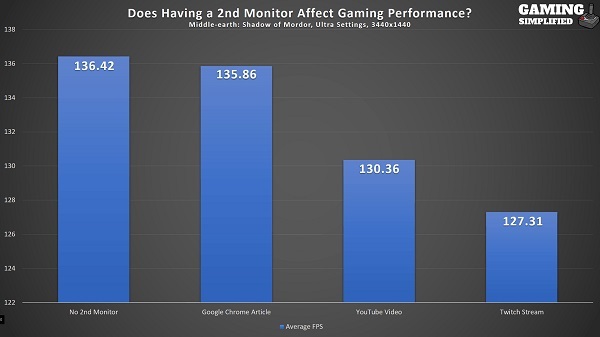
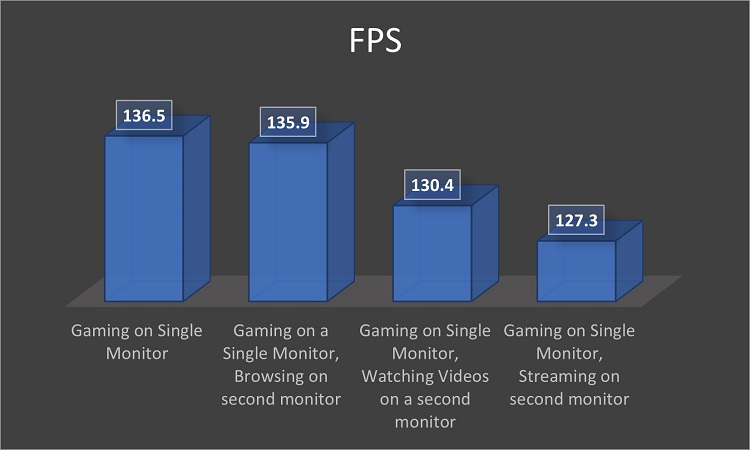
For most modern gaming setups, running a second monitor for non-gaming tasks like Discord, browsing, or streaming video typically has a minimal to negligible impact on your primary game's frame rate. The main game renders on your dedicated GPU, and background tasks are often handled efficiently by both the GPU and CPU without significant resource contention. Major performance drops usually only occur if the secondary display is actively running another demanding application or if your hardware is significantly older or underpowered.
What specific hardware components are most affected by a dual monitor setup?
Your Graphics Processing Unit (GPU) is the primary component that manages all display outputs. Running a second monitor increases its VRAM usage and processing load, especially if you have a high-resolution or high-refresh-rate secondary display, or if you are running complex applications on it. The CPU also plays a role in managing background processes, but its impact on gaming performance due to a second monitor is generally less direct than the GPU's. Adequate RAM ensures smooth multitasking.
How can I minimize any potential FPS loss when using a second screen?
To minimize FPS loss, ensure your primary gaming monitor is set as the main display. Close any unnecessary background applications on both screens. Consider lowering the refresh rate or resolution of your secondary monitor if it's demanding. Utilize hardware acceleration settings wisely in applications like Discord or web browsers on the second screen. Keeping your GPU drivers updated is also crucial for optimal multi-monitor management.
Is a dedicated GPU upgrade necessary for smooth dual monitor gaming?
For casual use of a second monitor while gaming, a dedicated GPU upgrade isn't typically necessary if your current card already handles your primary gaming monitor well. However, if you plan to game across multiple screens, stream your gameplay, or run resource-intensive applications on your secondary display, upgrading to a more powerful GPU with ample VRAM (e.g., 8GB or more) would significantly enhance your experience and prevent potential bottlenecks.
Does having different refresh rates on two monitors cause issues?
Yes, having monitors with significantly different refresh rates can sometimes cause minor issues like stuttering or tearing on one of the displays, particularly on the secondary one, due to Windows' display compositor. While it usually doesn't severely impact the primary game's FPS, it can be distracting. Modern GPUs and Windows updates have improved this, but matching refresh rates or using a high-quality GPU can further mitigate these effects.
Can the resolution of my secondary monitor impact primary game performance?
Absolutely. A higher resolution on your secondary monitor means your GPU has to render more pixels, even if it's just for desktop applications. If you have a 4K secondary monitor alongside a 1080p gaming monitor, the GPU is still processing a much larger total pixel count than with two 1080p monitors. This increased load, especially if the secondary monitor is showing dynamic content, can slightly reduce resources available for your main game, leading to marginal FPS drops.
What are the main benefits of a dual monitor setup for the average gamer?
The benefits are numerous for the average gamer balancing life and leisure. A second monitor allows for seamless multitasking: keeping an eye on Discord chats, watching a walkthrough, monitoring system performance, or even catching a stream without alt-tabbing out of your game. It significantly enhances productivity and social engagement, letting you stay connected and informed while immersed in your favorite titles, making for a much smoother overall PC experience.
Hey fellow gamers! Ever found yourself deep in a raid, a competitive match, or exploring a vast open world, wishing you could keep an eye on Discord chat, a game guide, or even a stream without constantly alt-tabbing? You're not alone. Many of us, especially those balancing jobs, families, and life's demands with our gaming passion, seek ways to enhance our setup for both productivity and pure enjoyment. With 87% of US gamers regularly diving into their favorite titles, often for 10+ hours a week, and social gaming trends skyrocketing, a second monitor seems like the perfect solution for seamless multitasking. But then the nagging question pops up: does having 2 monitors decrease gaming performance?
It's a common concern, and a valid one. Nobody wants to invest in a second screen only to see their precious frame rates plummet. Gamers value smooth performance, relaxation, and fun, and any setup issue that compromises that can be a real pain point. You've worked hard for your rig, and you deserve to get the most out of it. This guide is here to cut through the hype and provide practical, real-world answers. We'll explore exactly how a dual monitor setup impacts your system, identify potential pitfalls, and, most importantly, show you how to optimize your experience so you can enjoy the best of both worlds: enhanced multitasking without sacrificing your in-game FPS. Let's dive in and make sure your secondary display is a power-up, not a downgrade.
What impact does a second monitor truly have on gaming performance?
The straightforward answer is: usually minimal, but it depends. For most modern gaming PCs, running a second monitor primarily for non-gaming tasks like Discord, a web browser, or a video stream will have a negligible impact on your primary game's frame rate. Your Graphics Processing Unit (GPU) is designed to handle multiple displays simultaneously. When you're gaming on one screen, the GPU is primarily focused on rendering that high-intensity application. The secondary monitor's display output and any lightweight applications running on it typically only consume a small fraction of your GPU's resources and VRAM.
However, if your secondary monitor is running a demanding application, such as another game, a complex video editing suite, or heavy streaming software, then yes, you will likely see a noticeable decrease in performance on your primary gaming screen. The key is how resource-intensive the tasks on the secondary display are. For the average gamer using it for social interaction or quick references, the performance hit is often imperceptible.
How does your GPU handle dual monitors while gaming?
Your Graphics Processing Unit is the core component responsible for driving all your displays. When you have two monitors connected, the GPU effectively creates two separate display outputs. For your primary gaming monitor, the GPU dedicates most of its processing power and video memory (VRAM) to rendering your game at its specified resolution and refresh rate. For the secondary monitor, it renders the desktop environment and any applications running there.
Modern GPUs, even mid-range cards, are incredibly efficient at this. They have dedicated display controllers and plenty of VRAM to manage multiple outputs without significantly compromising the performance of the primary display. Think of it like a chef preparing a gourmet meal (your game) while also boiling water for tea (your secondary tasks). Both are happening, but one requires far more attention and resources. The more powerful your GPU, the more headroom it has to handle these simultaneous tasks without breaking a sweat.
Does the CPU play a role in multi-monitor gaming performance?
Absolutely, the Central Processing Unit (CPU) plays a supportive, but often less direct, role in multi-monitor gaming performance compared to the GPU. While the GPU is busy rendering visuals, the CPU handles all the background processes running on your system, including those applications displayed on your second monitor. This means managing Discord, your browser tabs, streaming software, or any other utilities you might have open.
A stronger CPU with more cores and threads can handle these background tasks more efficiently, leaving your GPU free to focus primarily on the game. If you have an older or less powerful CPU, or if you're running many CPU-intensive applications on your secondary screen, you might experience a slight bottleneck or stuttering. However, for most modern CPUs (Ryzen 5/7, Intel i5/i7 or better), this impact is minimal as gaming itself is often more GPU-bound, and modern processors are adept at multitasking.
What types of games are most affected by a second monitor?
Generally, games that are heavily reliant on your GPU or CPU, or those that are poorly optimized, will show the most sensitivity to a secondary monitor setup. Here's a breakdown:
GPU-Bound Games: Titles with highly detailed graphics, demanding physics, or intense visual effects (e.g., Cyberpunk 2077, Starfield, Microsoft Flight Simulator) at high resolutions (1440p, 4K) or refresh rates (144Hz+) will push your GPU to its limits. Any additional load from a second monitor, even minor, could cause a slight dip in FPS.
CPU-Bound Games: Strategy games with many units, city builders, or large-scale multiplayer games (e.g., Crusader Kings, Cities: Skylines, competitive MMOs with many players on screen) that rely heavily on complex calculations and AI can be sensitive to CPU strain. If your second monitor is running a CPU-intensive application, you might see a more noticeable effect.
Poorly Optimized Games: Some games, regardless of their visual fidelity, might simply not be well-optimized for modern hardware or multi-threading. These titles can be more prone to performance issues with any additional background tasks, including those on a second screen.
Conversely, older titles, less graphically demanding games, or games that offer excellent optimization are far less likely to show any noticeable performance degradation from a second monitor.
Are there specific hardware recommendations for optimal dual monitor gaming?
While you don't necessarily need a top-tier setup to run two monitors, having the right hardware can ensure a smooth, lag-free experience. Here's what to look for:
Graphics Card (GPU): This is your most critical component. Aim for a GPU with at least 8GB of VRAM, especially if your primary monitor is 1440p or 4K. Cards like the NVIDIA GeForce RTX 3060/4060 or AMD Radeon RX 6700 XT/7700 XT and above offer excellent multi-display capabilities. The more demanding your gaming and secondary tasks, the more powerful your GPU should be.
Processor (CPU): A modern multi-core CPU (e.g., Intel Core i5/i7 12th gen or newer, AMD Ryzen 5/7 5000 series or newer) will efficiently handle background tasks on your second monitor without impacting your game. More cores mean better multitasking.
RAM: 16GB of RAM is the sweet spot for modern gaming and multitasking. If you often have many browser tabs, Discord, and other apps open, 32GB can provide even more headroom and ensure absolute smoothness.
Monitor Types: While you can mix and match, consider the resolution and refresh rate of both. A high-refresh-rate gaming monitor (144Hz+) paired with a standard 60Hz secondary display is common. Ensure your GPU has enough display outputs (HDMI, DisplayPort) for both monitors.
Cables: Don't skimp on display cables. Use high-quality DisplayPort or HDMI cables that support the resolution and refresh rate of your monitors to avoid flickering or signal issues.
How can software settings optimize dual monitor performance?
Optimizing your software settings is crucial to getting the best performance out of your dual monitor setup. Even with powerful hardware, incorrect settings can lead to inefficiencies.
GPU Drivers: Always keep your graphics card drivers up to date. NVIDIA, AMD, and Intel regularly release driver updates that include performance optimizations and bug fixes for multi-monitor setups. Check for updates monthly.
Windows Display Settings: In Windows Display Settings, ensure your primary gaming monitor is correctly identified as the main display. Verify that both monitors are running at their native resolution and desired refresh rates. Be mindful of scaling options; sometimes inconsistent scaling can cause minor performance hiccups.
Game Settings: Run your game in fullscreen exclusive mode whenever possible. While borderless windowed mode is convenient for alt-tabbing, fullscreen exclusive gives the game direct control over your GPU, potentially yielding slightly better FPS. If you must use borderless, ensure no demanding processes are running on the second screen.
Background Apps: Close unnecessary background applications. Every open program consumes CPU, RAM, and potentially GPU resources. Be mindful of apps running on your second screen, especially those with hardware acceleration enabled (like some web browsers or video players) which can increase GPU load.
NVIDIA/AMD Control Panel: Dive into your GPU control panel. Here, you can often find specific settings for multi-display setups, power management modes (set to 'Prefer Maximum Performance'), and global 3D settings that can be tweaked for better efficiency.
What are the benefits of a second monitor for gamers?
For many gamers, the benefits of a second monitor far outweigh any minimal performance considerations. It's about enhancing the overall PC experience and fitting gaming seamlessly into a busy life.
Enhanced Multitasking:
Social Hub: Keep Discord, Twitch chat, or other communication apps visible. Social gaming is a huge trend in 2026, and staying connected with your squad or community without disrupting your gameplay is invaluable.
Game Guides & Wikis: No more pausing or alt-tabbing to look up a quest detail, a crafting recipe, or a boss strategy. Keep a guide open on your second screen.
Streaming & Content Creation: For aspiring streamers, a second monitor is essential for monitoring chat, streaming software (OBS, Streamlabs), and analytics without taking up valuable screen real estate from your game.
System Monitoring: Keep an eye on your CPU/GPU temperatures, usage, and FPS with monitoring tools like MSI Afterburner or HWMonitor. This helps diagnose issues quickly.
Productivity & Quality of Life:
Work/Life Balance: For gamers balancing jobs and family, a second screen means easier transitions between work tasks and leisure. Keep emails or calendars open on one screen while your game loads on the other, or use it for home organization tasks.
Media Consumption: Watch YouTube, Netflix, or listen to music without impacting your main game. It's perfect for casual gaming sessions or during game downtimes.
The convenience and improved workflow offered by a second screen are transformative, making your entire computing experience more enjoyable and efficient.
Common pitfalls: Avoiding performance drops with dual monitors
While a second monitor generally won't cripple your FPS, there are some common mistakes and scenarios that can lead to performance issues. Awareness is key to avoiding these pain points.
Running Demanding Apps on Both Screens: Trying to run a graphically intensive game on your primary monitor while simultaneously rendering a high-resolution video or another graphically demanding application on the second can strain your GPU beyond its limits. Stick to lightweight apps on the secondary display.
Mismatched Refresh Rates: Having drastically different refresh rates (e.g., 144Hz main, 60Hz secondary) can sometimes lead to micro-stuttering or frame pacing issues, especially if content is actively updating on the 60Hz screen. While modern drivers are better, it's still a potential irritant.
Outdated Drivers: As mentioned, old GPU drivers are a common culprit for all sorts of display and performance issues. Always keep them updated.
Insufficient VRAM: If your GPU has limited VRAM (e.g., 4GB or less) and you're trying to game at high resolutions while also running a second display, you might experience VRAM exhaustion, leading to significant FPS drops and stuttering.
Cable Quality: Cheap or faulty display cables can lead to signal loss, flickering, or even force your monitor to run at a lower resolution or refresh rate, which can indirectly affect perceived performance.
Poorly Managed Background Processes: Even if tasks on the second screen aren't graphically intense, having dozens of Chrome tabs, multiple background apps, and software updates running simultaneously can eat up CPU and RAM, impacting overall system responsiveness.
Should you upgrade your GPU for a dual monitor setup?
This is a budget-focused question many gamers face. The necessity of a GPU upgrade for a dual monitor setup largely depends on your current hardware, your primary gaming monitor's specifications, and what you plan to do on your secondary screen.
Existing Performance: If your current GPU already struggles to maintain acceptable FPS on your primary gaming monitor alone, then adding a second monitor will likely exacerbate those performance issues. In this case, an upgrade is highly recommended.
Secondary Monitor Usage: If your second monitor is purely for static content like Discord chat or a basic web page, a GPU upgrade might not be necessary. However, if you plan to actively stream, edit video, or watch high-resolution content on the second screen while gaming, a more powerful GPU with ample VRAM (12GB+ for 1440p/4K gaming setups) would be a wise investment to maintain smooth performance on both displays.
Future-Proofing: Given the rapidly evolving graphics of modern games and the growing trend of higher resolution and refresh rate monitors, investing in a robust GPU now will ensure your setup remains relevant and performs well for years to come, accommodating both gaming and multitasking needs.
Consider your budget and prioritize based on your specific use case. For many, a current mid-to-high range GPU will handle two monitors without breaking a sweat.
Is it worth it? The value proposition of dual monitor gaming in 2026
In 2026, with gaming becoming an even more integrated part of daily life for many, a dual monitor setup offers immense value. For the average gamer, often juggling work, family, and personal time, every moment spent gaming should be enjoyable and efficient. Dual monitors directly address several common pain points:
Enhanced Experience: No more frustration from alt-tabbing out of an immersive game. Stay connected with friends on Discord, follow a walkthrough, or manage your stream, all while your game runs uninterrupted.
Productivity Boost: Beyond gaming, a second screen dramatically improves general PC usage, making it easier to manage work tasks, browse, or consume media.
Social Integration: Social gaming is bigger than ever. Being able to see and respond to chat, participate in community events, or just watch a friend's stream on the side makes the gaming experience richer and more communal.
Performance Monitoring: Keep tabs on your system's health without an overlay, allowing for quick adjustments if performance dips.
The minimal, often imperceptible, performance impact from a properly configured dual monitor setup is a small trade-off for the significant gains in convenience, multitasking ability, and overall enjoyment. It truly elevates the entire PC experience, making it a worthwhile upgrade for most gamers.
Frequently Asked Questions (FAQ)
Here are some quick answers to common questions about dual monitor gaming.
Do I need matching monitors for a dual setup? No, you don't. You can mix and match resolutions and refresh rates. However, for the smoothest experience, ensure your primary gaming monitor is dedicated for high performance and the secondary monitor is for less demanding tasks.
Can I game on one monitor while watching a video on the second? Yes, absolutely! This is one of the most common and beneficial uses of a dual monitor setup. As long as the video isn't overly demanding (e.g., a 4K HDR stream requiring significant GPU decode), your game's performance should remain largely unaffected.
Will a second monitor cause input lag? A second monitor itself typically does not cause input lag on your primary gaming display. Input lag is usually related to the response time of your primary monitor, its refresh rate, or specific game settings, not the presence of an additional display output.
How much VRAM does a second monitor use? For basic desktop display, a second monitor uses a very small amount of VRAM, usually a few hundred MBs. This amount increases if you're displaying complex animations, high-resolution videos, or other graphically intensive applications on the secondary screen.
Is it better to use DisplayPort or HDMI for dual monitors? For your primary gaming monitor, DisplayPort is generally preferred as it often supports higher refresh rates and resolutions with features like G-Sync or FreeSync. For the secondary monitor, either DisplayPort or HDMI is fine, depending on the monitor's inputs and desired features.
My FPS drops significantly when I move my mouse to the second screen. Why? This can happen if your game is running in exclusive fullscreen mode and you're moving the mouse to a second display. The game might temporarily lose focus, causing a brief stutter or drop as Windows re-prioritizes. Running in borderless windowed mode can alleviate this, though it might introduce a very slight, constant performance overhead.
Can I turn off my second monitor to save FPS? Yes, physically turning off or disconnecting your second monitor will reduce its load on your GPU to zero, potentially freeing up minimal resources. However, for most modern systems, the performance gain from this action is often negligible unless you were running something very demanding on the secondary screen.
In conclusion, the question of "does having 2 monitors decrease gaming performance" can generally be answered with a reassuring "no, not significantly, if set up correctly." For the average gamer in 2026, the immense benefits of multitasking, staying social, and improving workflow far outweigh the minimal performance considerations. By understanding how your hardware works, optimizing your software settings, and avoiding common pitfalls, you can easily enjoy a seamless and enhanced gaming experience with a secondary display.
What's your biggest gaming challenge with your current setup? Comment below and let's help each other out!
Dual monitors generally dont impact main game FPS significantly if configured correctly. GPU handles rendering the main game and secondary tasks efficiently. CPU manages background processes on the second screen. Optimizing software settings and hardware can prevent performance drops. Multitasking benefits like Discord, guides, or streams often outweigh minimal performance risks. Modern GPUs are designed for multi-display setups. Proper cable management and driver updates are crucial for stability and performance. Consider refresh rates and resolutions of both displays for best results.
35



Benefits Of Dual Monitor Gaming Advantages Of Two Displays Goldy Copy Of Add Text To Inline Images 46 1 2048x1152 . Gaming Monitor Guide 2026 Everything You Need To Know London Daily News Gaming Monitor Guide 2026 Everything You Need To Know11. World S First 1 080 Hertz Gaming Monitor With Dual Mode Support . Does Dual Monitor Affect FPS Tech Inspection Does Using Dual Monitors Use More GPU 1 . Does Dual Monitor Affect FPS Tech Inspection Does Dual Monitor Affect FPS 768x432


Dual Monitor Gaming Performance At Hilda Morones Blog 20190730 194129 . Need To Use Two Displays Here S How To Set Up Dual Monitors Dual Monitor Setup With Pc . Best Computer And Monitor 5 Best Monitors For Dual Setup 4257. The Ultimate Guide To Setting Up A Dual Monitor Gaming Setup Arzopa Dual Monitor Gaming Setup . Display Is Larger Than Monitor Screen Size Size TBXSUN



How Dual Mode Gaming Monitors Improve FPS And Visual Quality Gaming Monitors Improve FPA 1 . Are Dual Monitors Worth It YouTube . Yes OLED Gaming Monitors Can Work Great In Sunny Rooms Here S What To . Unlock Optimal Gaming Performance Tips For Proper Monitor Placement Gaming Monitor Ergonomics 1024x585 . 3 Ways It Can Make Sense To Use Multiple GPUs Inside Your PC Tools For Dual Monitors


Does Dual Monitors Lower FPS Explained Techdim Picture2 5 . Dual 32 Inch Monitor Setup R Setups Dual 32 Inch Monitor Setup V0 . How To Set Up Dual Monitors With Laptop 2026 Complete Guide Arzopa How To Set Up Dual Monitors With Laptop 2.avif. Does Dual Monitors Lower FPS Explained Techdim Picture1 6 . Does Dual Monitors Lower FPS Explained Techdim Does Dual Monitors Lower FPS 300x140

Does Dual Monitor Use More GPU PC Guide 101. Does Adding A Second Monitor Affect Performance Adcod Com Does Adding A Second Monitor Affect Performance . Does Dual Monitors Lower FPS Explained Techdim Picture4 2 . Prepare For Tandem OLED Splendor With These New ROG Gaming Monitors . BEST Gaming Monitor In 2026 Here S What You SHOULD Buy At Every


Best Picture Quality Gaming Monitor . PC Gaming Does Using Multiple Monitors Affect Performance 1691680087 499 PC Gaming Does Using Multiple Monitors Affect Performance . ASUS Zenbook Duo 2026 Review Do You Actually Need Two Screens ASUS Monitors Explained Overview Main . How To Use Second Monitor While Gaming On Primary Best Gaming Monitor Guide That Shows The Top Best Gaming Monitor Model 1 2048x1152 . Does Having 2 Monitors Decrease Gaming Performance Games Learning Hqdefault


Computer Monitor Maximum Size At Wilfred King Blog . Samsung 2026 Monitors 1 Large . How To Set Up And Configure Dual Monitors For Maximum Dual Monitors Setup . How Multiple Monitors Affect Gaming Performance Pros And Cons BLGQMG Monitor 45 1920x1491 . This Dual Ultrawide Monitor Gaming Setup Is Overkill YouTube